- 이 문제는 11학년 제로 베이스 백엔드 학교 데이터 구조 문제입니다.
문제 설명
- 이메일 정보의 2차원 문자열 배열인 Accounts가 입력됩니다.
- accounts(i)(0)은 사람의 이름이고 accounts(i)(1)은 이메일을 나타내는 구조입니다.
- 한 사람이 여러 개의 이메일을 가질 수 있으며 같은 이름을 가진 사람들이 있을 수 있습니다. 그들을 구별하는 방법:
- 이름이 같고 이메일 주소가 다르면 동일인입니다.
- 이름이 동일하고 이메일 중 동일한 이메일이 있으면 동일한 사람(이메일이 여러 개인 사람)에 대한 것입니다.
- 이 시점에서 이메일 정보를 수집하고 인쇄하는 프로그램을 작성하십시오.
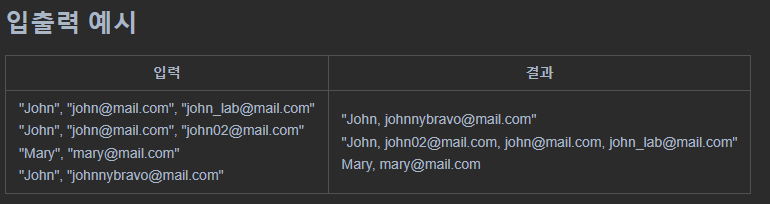
문제 접근
- 얼핏 보면 어려워 보인다. 하지만 입력 부분을 자세히 보면 그래프로 모델링할 수 있습니다.
- 이름과 이메일 주소가 동일한 경우 위의 조건 중 하나로 동일인 조건을 찾습니다. 이들은 상위 노드와 동일한 이메일 주소를 가진 하위 노드로 생각할 수 있습니다.
- 위의 입력에서 [email protected], [email protected], [email protected], [email protected]은 [email protected]이 입력된 노드를 데이터로 표현하였다고 생각하시면 됩니다. 이 작업을 수행하는 노드로.
- 그러면 위의 규칙에 의해 적절한 이름으로 그래프를 모델링할 수 있고, 이러한 그래프를 순회하여 이메일 정보를 수집할 수 있을 것 같습니다.
import java.util.*;

public class Practice3 {
    public static ArrayList<ArrayList<String>> solution(ArrayList<ArrayList<String>> accounts) {

    }

    public static void main(String() args) {
        // Test code
        ArrayList<ArrayList<String>> accounts = new ArrayList<>();
        accounts.add(new ArrayList<>(Arrays.asList("John", "[email protected]", "[email protected]")));
        accounts.add(new ArrayList<>(Arrays.asList("John", "[email protected]", "[email protected]")));
        accounts.add(new ArrayList<>(Arrays.asList("Mary", "[email protected]")));
        accounts.add(new ArrayList<>(Arrays.asList("John", "[email protected]")));
        accounts = solution(accounts);
        for (ArrayList<String> item: accounts) {
            System.out.println(item);
        }
    }
}
문제를 해결하다
- 먼저 그래프 모델링부터 시작해야 합니다.
- 차트는 맵 데이터 구조를 사용하여 구현되며 해당 이메일과 연결된 이메일 및 기타 이메일 노드를 나타내야 합니다.
- 또한 각 이메일의 소유자 이름을 저장하는 name도 카드 데이터 구조로 구현됩니다.
public static ArrayList<ArrayList<String>> solution(ArrayList<ArrayList<String>> accounts) {
    // {"이메일", 해당 이메일과 연결된 노드들(이메일들)} 로 되어있는 해시맵
    HashMap<String, HashSet<String>> graph = new HashMap<>();
    HashMap<String, String> name = new HashMap<>();

    for (ArrayList<String> account : accounts){
        String userName = account.get(0);

        for (int i = 1; i < account.size(); i++){
            if (!graph.containsKey(account.get(i))){
                graph.put(account.get(i), new HashSet<>());
            }

            name.put(account.get(i), userName);

            if (i == 1){
                continue;
            }

            // 그래프 연결
            graph.get(account.get(i)).add(account.get(i - 1));
            graph.get(account.get(i - 1)).add(account.get(i));
        }
    }
}- 입력된 계정 정보를 하나씩 읽어 해당 이메일이 차트에 이미 존재하는 이메일인지 먼저 확인합니다. 그런 다음 아직 존재하지 않는 경우 해당 이메일 정보가 있는 노드가 생성되어 그래프에 추가됩니다.
- 그런 다음 이름에 이메일과 이메일 소유자를 입력하고 이름을 관리하는 카드를 저장하십시오.
- 그런 다음 각 그래프가 연결됩니다. 전자 메일의 소유자가 모두 같으므로 전자 메일이 서로 옆에 있는 것으로 가정할 수 있습니다. 따라서 이전 노드와 현재 노드가 함께 연결됩니다.
- 이제 다이어그램 모델링이 완료되었으므로 각 다이어그램에서 DFS 검색을 수행할 수 있습니다.
public static ArrayList<ArrayList<String>> solution(ArrayList<ArrayList<String>> accounts) {
    // {"이메일", 해당 이메일과 연결된 노드들(이메일들)} 로 되어있는 해시맵
    HashMap<String, HashSet<String>> graph = new HashMap<>();
    HashMap<String, String> name = new HashMap<>();

    for (ArrayList<String> account : accounts){
        String userName = account.get(0);

        for (int i = 1; i < account.size(); i++){
            if (!graph.containsKey(account.get(i))){
                graph.put(account.get(i), new HashSet<>());
            }

            name.put(account.get(i), userName);

            if (i == 1){
                continue;
            }

            // 그래프 연결
            graph.get(account.get(i)).add(account.get(i - 1));
            graph.get(account.get(i - 1)).add(account.get(i));
        }
    }

    // 방문 기록용
    HashSet<String> visited = new HashSet<>();
    ArrayList<ArrayList<String>> result = new ArrayList<>();

    // 그래프에 저장된 모든 이메일들에 대해 방문하지 않았다면 DFS수행
    for (String email: name.keySet()){
        ArrayList<String> list = new ArrayList<>();

        if (visited.add(email)){
            dfs(graph, email, visited, list);
            Collections.sort(list);

            list.add(0, name.get(email));

            result.add(list);
        }
    }

    return result;
}- HashSet은 중복 데이터가 입력되면 false를 반환합니다. 따라서 이미 방문했는지 확인하기 위해 add의 반환 값을 사용할 수 있습니다.
- 그런 다음 이메일과 관련된 수신 목록을 정렬하고 이메일 소유자를 앞에 추가하고 결과에 포함하십시오.
- 그런 다음 결과를 반환하고 종료합니다.
public static void dfs(HashMap<String, HashSet<String>> graph, String email, HashSet<String> visited, ArrayList<String> list){
    list.add(email);

    for (String next: graph.get(email)){
        if (visited.add(next)){
            dfs(graph, next, visited, list);
        }
    }
}- dfs는 재귀적으로 구현됩니다. 전자 메일과 연결된 노드를 순회하고 방문한 노드가 있는지 확인하고 방문하지 않은 노드를 방문하는 DFS의 논리는 변경되지 않은 상태로 구현됩니다.
- 전체 코드는 다음과 같습니다.
import java.util.*;

public class Practice3 {
    public static ArrayList<ArrayList<String>> solution(ArrayList<ArrayList<String>> accounts) {
        HashMap<String, HashSet<String>> graph = new HashMap<>();
        HashMap<String, String> name = new HashMap<>();

        for (ArrayList<String> account : accounts){
            String userName = account.get(0);

            for (int i = 1; i < account.size(); i++){
                if (!graph.containsKey(account.get(i))){
                    graph.put(account.get(i), new HashSet<>());
                }

                name.put(account.get(i), userName);

                if (i == 1){
                    continue;
                }

                graph.get(account.get(i)).add(account.get(i - 1));
                graph.get(account.get(i - 1)).add(account.get(i));
            }
        }

        HashSet<String> visited = new HashSet<>();
        ArrayList<ArrayList<String>> result = new ArrayList<>();

        for (String email: name.keySet()){
            ArrayList<String> list = new ArrayList<>();

            if (visited.add(email)){
                dfs(graph, email, visited, list);
                Collections.sort(list);

                list.add(0, name.get(email));

                result.add(list);
            }
        }

        return result;
    }

    public static void dfs(HashMap<String, HashSet<String>> graph, String email, HashSet<String> visited, ArrayList<String> list){
        list.add(email);

        for (String next: graph.get(email)){
            if (visited.add(next)){
                dfs(graph, next, visited, list);
            }
        }
    }

    public static void main(String() args) {
        // Test code
        ArrayList<ArrayList<String>> accounts = new ArrayList<>();
        accounts.add(new ArrayList<>(Arrays.asList("John", "[email protected]", "[email protected]")));
        accounts.add(new ArrayList<>(Arrays.asList("John", "[email protected]", "[email protected]")));
        accounts.add(new ArrayList<>(Arrays.asList("Mary", "[email protected]")));
        accounts.add(new ArrayList<>(Arrays.asList("John", "[email protected]")));
        accounts = solution(accounts);
        for (ArrayList<String> item: accounts) {
            System.out.println(item);
        }
    }
}